
Registration
TriBatch Registration
As of March 27, 2020, TriBatch Pro is free for all future and current users.
You can unlock the TriBatch Pro mode by generating your own key using the key generator spreadsheet:
TriBatch_Registration_Code_Generator.xlsm
If you are having trouble downloading the .xlsm file, try downloading the zipped version:
TriBatch_Registration_Code_Generator.zip
Obtaining a Request Code
Each license carries a registration code that is uniquely tied to a single computer. In order to obtain the free Registration Code, you must copy the Request Code for that is unique to your computer and paste it into the Registration Code Generator, along with your User Name.
To obtain the Request Code click on Register TriBatch in the TriBatch group on the left side of the Data tab. If you are running Excel 2003 or older, select Register TriBatch on Excel’s Tools menu.
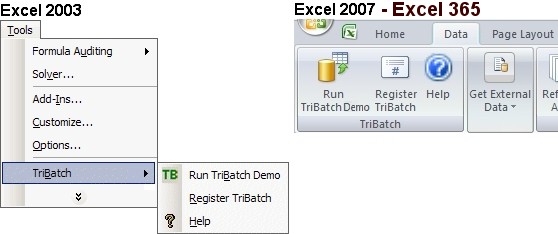
Next, click on the Enter Registration Code button in the Register TriBatch dialog. This will display the Enter Registration Code window which will display the Request Code for This Computer.
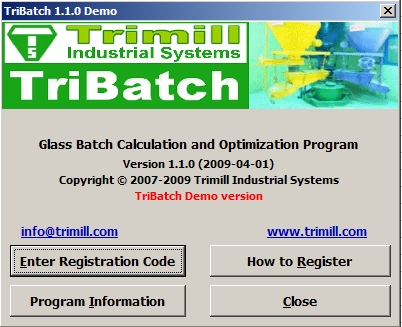
Next, copy the Request Code for This Computer and paste it into the Registration Code Generator, along with your User Name, to obtain the Registration Code.

Entering Registration Code
To enter the Registration Code, click on the Enter Registration Code button in the TriBatch start-up window (shown when you click on Register TriBatch on Excel’s Tools menu). In Excel 2007 to Excel 365 click on Register TriBatch in the TriBatch group on the left side of the Data tab.
You will be prompted to enter your Registered User Name and the corresponding Registration Code. Note that you will not be able to change the request code - it is unique to each computer.

Once entered, your User Name will be displayed in the splash screen every time you start TriBatch and in the About TriBatch dialog (click About TriBatch on the TriBatch Help).
Copyright © Trimill Industrial Systems Inc.